

In October 2025, Perplexity AI announced a major shift: its AI-powered browser, Comet, is now free for all users. The browser had launched earlier in July for premium subscribers, but the move to make it freely available is a signal of its ambitions. According to The Verge:
“Perplexity’s AI-powered browser, Comet, is now available to everyone for free.”
This is a big step in the rapidly evolving world of AI-native browsers, where companies are trying to move beyond simply adding AI assistants to browsers and instead build the browser around the AI. Let’s break this down: what Comet offers, why this matters, what advantages and risks it carries, and how users and the broader tech ecosystem should respond.
What Is Comet?
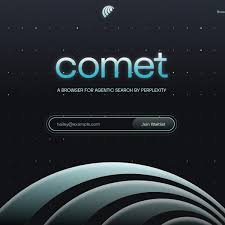 Comet is a web browser built by Perplexity AI, designed to integrate AI deeply into the browsing experience rather than being a browser + AI add-on, the AI is baked into the browser itself.
Key facts:
-
It’s built on the Chromium platform (the same open-source foundation used by Google Chrome, Microsoft Edge, etc.).
-
It uses Perplexity’s AI answer engine (which does summarization, search, context understanding) as the default search experience.
-
Features include: an AI assistant sidebar/contextual panel, agentic tasks (the AI does tasks for you, e.g., summarizing content, managing tabs, researching).
-
It supports browser-essentials like importing bookmarks, extensions (thanks to Chromium base) while adding new workflow features (e.g., @tab referencing, summarization of videos/pages).
Initially, Comet was only available to Perplexity’s highest-tier subscription (Max, at US $200/month) and select invitees. But the October move changes that.
Free for All Users: What That Change Means
The announcement
According to TechRadar and Times of India, Perplexity stated that Comet is now free for everyone (free tier) including new users and that advanced features may still exist for paid tiers. The Verge clarifies:
“No subscription at all will be needed to use Comet going forward, the company says.”
Why this matters
-
Lower barrier to entry: Anyone can download and use Comet without paying, which greatly expands the potential user base.
-
Browser as platform: Web browsers are foundational software on every computer/phone. If Comet becomes your default browser, Perplexity gets constant exposure and usage data, strengthening its AI.
-
Competitive positioning: By offering the browser for free, Perplexity positions itself against giants like Google Chrome, Microsoft Edge, Apple Safari—especially in the “AI-enhanced browsing” race.
-
Data & retention strategy: Usage of a browser gives Perplexity insight into user habits, preferences, tabs, workflows—data which is critical in building intelligent agents and personalized experiences.
What remains paid
-
It appears that advanced capabilities such as deep agent automation, background assistant features, curated news/publisher access (Comet Plus) — may still be behind premium tiers.
-
Mobility: iOS/Android versions are still pending or in progress. True cross-platform availability will be key.
What Comet Actually Lets You Do
To understand the significance, here are practical capabilities:
-
Search + Summarization in one place: Rather than just query/search results, the AI provides synthesized responses.
-
Context-aware assistance: The AI sidebar can “see” the tab you’re on, can reference your open tabs via “@tab” feature to provide relevant answers.
-
Task automation: In theory, Comet can carry out multi-step tasks booking flights, filling forms, comparing products, summarizing content across tabs.
-
Workflow efficiency: If you do research, writing, planning, Comet aims to help you manage many tabs, avoid duplication, and stay focused. (For example: group research tabs, close distraction tabs).
These features point to a shift: from “browser = display tool” to “browser = assistant tool”.
Pros & Advantages
Here are some of the strengths of Comet’s free now offering:
-
Access to AI-native browsing: Users can try out what AI-integrated browsing feels like without cost.
-
Potential performance gains: For research, productivity, managing many open tabs/workflows, Comet may provide real advantages.
-
Extensibility and familiar interface: Because it’s built on Chromium, users coming from Chrome/Edge may find it easy to transition (extensions, bookmark import, etc)
-
Democratizing AI: By making the core browser free, Perplexity supports broader accessibility rather than only premium users.
-
Competitive pressure: The move may encourage other browser makers to innovate with their AI features, benefiting users.
Challenges & Risks: Things to Watch
 No product is perfect, and Comet carries risks especially because it’s new and AI-integrated.
1. Reliability & Accuracy of AI
Reviews show that while the concept is compelling, the AI still makes errors. For example, PCWorld noted an agent booking mistake:
“Comet assistant hallucinated and entered completely wrong dates…”
When the AI controls tasks or draws from multiple data sources, mistakes can have real consequences.
2. Privacy & Security
Because the browser is deeply integrated, with agents able to interact with emails/tabs/data (if allowed), there are novel security concerns. TIME’s “The perils of AI browsers” flagged a vulnerability (“CometJacking”) in which malicious links could trick the AI into leaking data.
3. Monetisation & Sustainability
Comet being free raises questions: How will Perplexity monetise the browser? Will data collection/ad features expand? The Register article mentions Perplexity’s aim to use user data for personalized advertising.
4. Adoption and Ecosystem
Competing with Chrome/Edge/Safari is difficult. Chrome holds ~68% of global browser market. Transitioning users requires compelling reasons, reliability, platform support (mobile), extension ecosystem, and performance.
5. Feature Gaps / Platform Lag
Mobile versions (iOS/Android) are pending or limited. Some features may still be behind paywalls. Some users may prefer trusted mature browsers over a “newer” product.
What This Means for Browsing & the Wider Internet
The fact that a startup is launching an AI-native browser and making it free is a meaningful signal for several broader trends.
-
Browsers becoming agent platforms: The concept of “browser as assistant” could accelerate, where the browser does more than display content—it automates, synthesizes, acts.
-
Search disruption: Perplexity started as an “answer engine” alternative to Google Search. By building a browser, it bypasses the search engine layer and integrates search+actions.
-
Data & attention stakes: Browsing history, tab behaviour, tasks are rich sources of data for intelligent systems. Who controls the browser may become even more important.
-
Competitive pressure on incumbents: Chrome, Edge, Safari will need to evolve their AI capabilities to stay relevant. Comet’s free launch is part of that competition.
-
Privacy/regulation shape-up: As browsers gain AI control, regulation around data access, user consent, transparency becomes more critical. The Comet “CometJacking” vulnerability is a warning sign.
How Users Can Get Started
If you’re interested in trying Comet now that it’s free, here are some steps and things to consider:
-
Download & Install: Visit Perplexity’s Comet page and install the browser for your platform (Windows/Mac).
-
Import your browser settings: You can import bookmarks, extensions, passwords from your previous browser to smooth the transition.
-
Explore the AI Assistant Sidebar: Click on the sidebar or use the “@tab” feature to ask questions about your current page, group tabs, summarise content.
-
Test agentic features: Try non-critical tasks like summarizing a research article, asking the browser to compare product specs, or organise open tabs. See how it handles them.
-
Check privacy settings: Review what data the browser can access (tabs, email, calendar) and whether you want to enable or disable those features. Secure your workflow accordingly.
-
Be cautious with critical workflows: Since this is a newer product, avoid relying on it for high-risk tasks (financial transactions, critical bookings) until you’re comfortable with its accuracy.
-
Stay updated: New features and mobile versions (iOS/Android) are expected. Monitor Perplexity’s announcements.
-
Give feedback: Since Comet is still evolving, user feedback may influence development. Using it early gives you a voice.
Is Comet Worth It?
Yes if you’re curious, willing to experiment, and value AI-enhanced productivity, Comet is a very interesting option. The fact that it’s now free removes the barrier to entry, letting you try this next generation of browsing without cost. It represents a shift from doing browsing to being “browsed with” an intelligent assistant.
However, keep expectations realistic: the product is new, AI can make mistakes, and full mobile support or extension ecosystem may lag established browsers. For now, it’s best viewed as a cutting-edge browser alternative, not necessarily a full replacement for Chrome/Edge in all workflows.
In the long run, Comet may influence how we think about the browser: not just as a tool to display web pages, but as a personal assistant that helps us do more, faster and smarter. If Perplexity succeeds, browsers may no longer be passive portals they may become active collaborators. To know more subscribe Jatininfo.in now.